10 Common Web Accessibility Errors That Are Affecting Your Business

Web accessibility is not just a technical issue or a practice intended for a few users. It is an element that directly impacts the browsing experience, SEO positioning, and a site's ability to convert visitors into customers.

I would like to start this article by making something very important clear: I am not, nor do I pretend to be, a design expert. My area of expertise is different, focused on digital advertising, social media, and more. That said, what I am going to tell you in my article is something so crucial for web design and development that even someone without a designer profile must understand its impact.
And yes, as you can see from the title, I'm going to talk about how important it is to have a website that is accessible.
Table of contents:
What is web accessibility?
Let's start with the basics, what is web accessibility. The most accepted definition by the W3C Web Accessibility Initiative says that:
Web accessibility means that websites, tools, and technologies are designed and developed so that people with disabilities can use them.
More specifically, people can:
perceive, understand, navigate, and interact with the Web
contribute to the Web
Web accessibility encompasses all disabilities that affect access to the web, including: auditory, cognitive, neurological, physical, speech, or visual.
The above definition is possibly the most elementary understanding of what this concept implies. In fact, accessibility arises from the needs of people with some type of disability. However, the concept has evolved to encompass other benefits. The Web Accessibility Initiative (WAI) mentions that accessibility also benefits people without disabilities, improving the user experience, including users of mobile devices, smartwatches, or people connected to a slow speed internet network.
Why is web accessibility important?
It seems to me that, as a concept, what accessibility is is clearer, but in practice it is more than that. It is a factor that directly influences how visitors to your site interact with it and, therefore, impacts the results you get from it: form submissions, product purchases, newsletter subscriptions, whatever.

An accessible website allows more people to explore it and complete actions in a seamless way, without problems or friction. In other words, happy visitors because they can navigate a website without problems. This has a favorable impact on KPIs such as average session duration, bounce rate, and conversions.
On the other hand, an accessible website helps in the SEO ranking of search engines like Google. Clear structures, legible content, and logical navigation not only help site users, but also help people "out there" find your site more easily.
Furthermore, and as I mentioned a moment ago, accessibility is not only for those people with some type of disability, but also for users who are browsing your site in less than ideal conditions (again, like the ones I told you about in the previous section). Ignoring this is shooting yourself in the foot because you are limiting the potential of your website.
At the end of the day, your site can have the best content in the world: interesting, entertaining, educational, etc., but if people cannot consume it in the best way, it is as if you had no content.
The Most Common Accessibility Errors
Finally, what everyone came for, I share with you this list of accessibility errors. Once again, these are failures that WebAIM has identified from the analysis of billions of pages:
Low contrast between text and background:
This means that the site text is difficult to read because colors are being used that do not generate enough contrast with each other. It is the most common error (over 81% of the pages studied), especially because some designers prioritize looking "modern," "crazy," "with punch," or some other adjective and leave aside that people can suffer eye strain or even discomfort from trying to read something that is not easy to read. Here I share a tool that I really like using to solve these types of cases.

Images without alternative text:
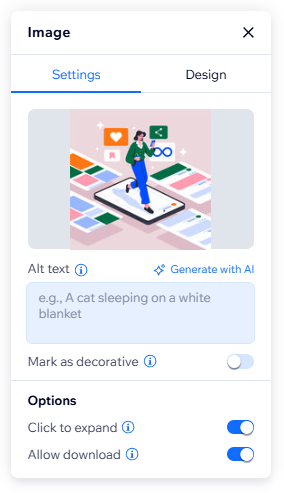
A site's content is not just the titles and paragraphs you write, but also the videos and images that accompany them. However, not all people can see this visual content: either due to some type of disability or simply because they are connected to a very slow network and cannot load the images correctly. When the latter happens, for example, instead of displaying the image, what is known as Alt Text, or alternative text of the image, is displayed, which (in theory) should serve to correctly describe what the image is showing. Website builders like Wix or Wordpress usually have fields where you can write the alternative text. Make sure to do so because it also helps Google better understand your site.
Poor header hierarchy:

Just as in a Word document we have a title, subtitles, headings, and paragraphs, a website also has them and we usually identify them with HTML tags such as H1, H2, H3, etc. As a general rule, a page on your site should only have one H1. It often happens that multiple H1s are used because it is believed that the larger the title, the more visible the text will be. And yes, that may be true, but what is actually occurring is that navigation is complicated and generates confusion because we don't understand which text is most relevant. Also, imagine you are visiting the site from a mobile device with a small screen. Saturating it with text that looks enormous will end up covering your entire screen. Correctly hierarchy your content!
Poorly labeled forms:
Nearly 49% of Start/Home pages have poorly labeled forms. This means that the site owner intends for users to fill out a series of fields to collect data from them (usually: Name, Email, and some additional Message). However, if we don't make it clear what we want from them, how will users know what to fill in the form? Remember, any friction users feel is one more reason they have to abandon your site and you would be losing a user, a new subscriber, and/or a potential customer. The minimum we can do is indicate what data goes in each field and which fields are mandatory to fill out. An extra step is to use what is known as placeholder text, which is a kind of example left for users to say: "Look, in this field I am expecting you to write this." Once the user enters the first character in the field, this placeholder text disappears, as it has fulfilled its function. I share an example so that what I mean is clearer:

Navigation not accessible by keyboard:

This error is perhaps more difficult to understand because we normally navigate a website with our computer mouse or with our fingers on a touch screen on our cell phone. However, there are users who for one reason or another need - or prefer - to use the arrows, Enter, or Tab, from the keyboard to carry out their navigation. This is especially critical in page elements such as drop-down menus, search filters, or action buttons. If the user cannot access them or gets "trapped" at some point in the navigation, goodbye! Fortunately, platforms like Wix Studio and Wordpress include these features to ensure that websites are navigable by keyboard, but it never hurts to do a double check to be sure.
Links and buttons without clear context:

Clickable buttons are, par excellence, the best option for showing a Call-to-action (call to action) that we expect users to carry out. They are essential elements within the construction of a website, but they are dependent on context. If you place a button that says "Click here," without additional information around it, do you really think users will click it? It is not just a matter of distrust but of not understanding what the site expects users to do. In addition, screen readers - those tools that describe by voice what is being shown on the screen of the user using this functionality - the only thing they will tell the user will be "Click here," without any additional context.
Sites poorly adapted to mobile:

According to StatCounter, more than 53% of global web traffic occurs from mobile devices. This behavior has been a reality in recent years: fewer and fewer users use their computers to browse. Hence the importance that the website you design can be not only visually attractive but easily navigable in its adaptation to mobile. Some elements that can create a poor user experience on mobile can include: text that is too small or exaggeratedly large, buttons that are difficult to press, overlapping elements, unnecessary horizontal scrolls, etc. The truth is that there are many site templates that are designed thinking more about desktop than mobile. Therefore, we must ensure that the user experience is as good on mobile as it is on desktop, to avoid an increase in the bounce rate or a decrease in conversions. Even more so if this is a criterion that search engines like Google consider important for SEO ranking.
Incorrect use of ARIA:
In HTML, ARIA is known as a set of special attributes to improve the accessibility of websites, and they are intended especially for users who use screen readers. These attributes do not change in themselves how a website looks, but rather serve as support for this assistive technology by telling it, for example: "This is an icon to close a pop-up window." In general, available templates bring an element in their native HTML that precisely fulfills the function of ARIA, so in many cases it is not necessary to add ARIA to the HTML, but it is good practice to make sure what is included and what is not in a template, if you are using one.

Multimedia content without subtitles or transcriptions:
There is audiovisual content (that is, videos) that is completely dependent on audio. Imagine a corporate video talking about how your business is the best and presenting real testimonials from your customers in front of the camera. The audio is key to the video. Therefore, it is essential that it includes subtitles for those users with a hearing disability or who cannot "consume" the audio because they are in an environment that does not allow it (they are not wearing headphones, they are in a noisy place or in an environment that requires silence, etc.) Subtitles increase user retention, improve comprehension of the material, support assistive technologies, and facilitate consumption. In addition, transcriptions help index content correctly by search engines like Google.

Unclear or non-existent error messages:
Between 48% and 51% of analyzed pages suffer from this problem. Think about the last time you tried to fill out a contact form, register on a platform, or finalize a purchase online and, suddenly, a generic message like "An error has occurred" appeared or some fields were marked in red without further explanation. The reality is that many websites do not correctly communicate what went wrong or how to resolve it, which increases friction and, therefore, user frustration. This often happens in forms where mandatory fields are not clearly identified, passwords do not meet certain requirements that were never explained, or expected formats (such as phone numbers or emails) are not evident.

The problem is not only one of user experience; it also directly affects conversion. Each additional friction point increases the chances of a user abandoning a form, a checkout, or a registration process before completing it. In addition, many error messages depend solely on visual elements such as the color red, which represents a barrier for people with visual difficulties or color blindness. An effective error message should clearly indicate what happened, why it happened, in which field it happened, and what the user should do to fix it.
SEO and web accessibility, are they the same?
I mentioned almost at the beginning of my article that accessibility helps in the SEO ranking of a website. Still, it would seem that they are the same, right? If you are avid readers of our blog, listen to our podcast or we have had the fortune of having had you as clients, you will be able to notice that many of the errors I just listed are equally linked to SEO. In fact, we usually tell our clients that they are actionable items to attend to if our SEO audit so indicates (and it is almost always the case).
The reality is that these two concepts are closely related because they share the same objectives: to create easy, high-quality experiences for users. Many of the elements that Google considers important for positioning a website are also aligned with good accessibility practices.
Note: SEO and accessibility are not the same. There are practices specifically focused on positioning and others centered on assistive technologies. However, when a website is well constructed from the user experience, normally both concepts end up benefiting each other.
In other words: a more accessible site is usually also a site that is easier to understand, navigate, and position.
References:
About the author

David Santos
Digital Marketing Specialist at Werko Marketing Solutions. He has over 10 years of experience in digital marketing. His primary focus is data monitoring and analysis for the management and optimization of digital advertising campaigns, websites, and e-commerce stores.
Subscribe to Marketing Insights!
And receive a bi-weekly newsletter directly to your inbox so you're among the first to know.